¶ Server printing operations and troubleshooting
¶ View printer status and print jobs
Printer status and print-job history are available in the Qwix Portal:
- Open Configuration in the navigation menu.
- Select Server Printers.
- Find the printer in the grid. Its current state appears in the Status column, and Date Last Print shows when it last submitted a job.

To view the jobs for a printer:
- Select the arrow at the start of the printer row to expand its details.
- Select the Job History tab.
- Review the report name, user, dates, status, worker name, attempt count, and error information for the relevant job.
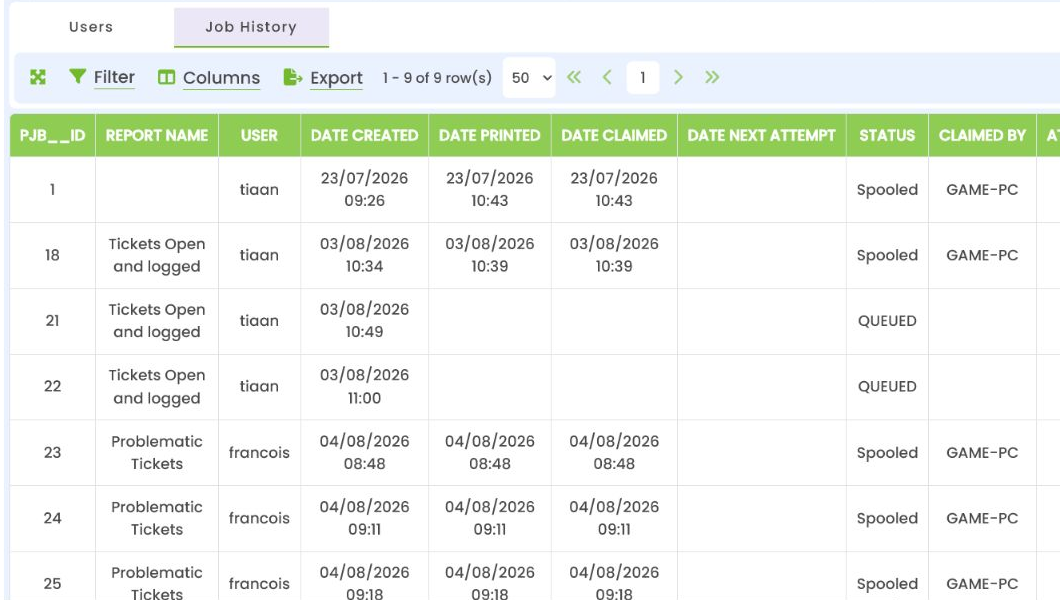
The QUEUED rows shown in this example are obsolete development test records. See Legacy test jobs below.
¶ Job lifecycle
The portal creates a print job containing the rendered Qwix report. A worker with the same name as the printer's Server value claims the oldest eligible job, marks it as spooling, submits it to Windows, and then marks it as spooled.
If printing fails, the worker records the error and retries until MaxAttempts is reached. A claimed or spooling job whose lease expires may be reclaimed, which protects the queue when a worker stops unexpectedly.
¶ Printer statuses
These values appear in the Status column of Configuration > Server Printers.
The worker reports these Windows printer states to Qwix:
| Status | Meaning |
|---|---|
Ready |
Windows reports that the printer is ready. |
Printing |
A document is being printed. |
WarmingUp |
The printer is preparing to print. |
Offline |
Windows reports the printer as offline. |
NotInstalled |
The printer name is not visible to the worker service account. |
LowPaper / NoPaper |
Paper supply requires attention. |
LowToner / NoToner |
Toner requires attention. |
DoorOpen |
A printer door or cover is open. |
PaperJam |
Windows reports a paper jam. |
OutputBinFull |
The output tray requires attention. |
ServiceRequested |
The printer reports that service is required. |
Stopped |
The Windows printer queue is stopped. |
StatusError |
The worker could not read the printer status. |
Unknown |
Windows returned a status not mapped by the worker. |
¶ Job statuses
These values appear on the printer's expanded Job History tab.
| Status | Meaning |
|---|---|
Pending |
The job is waiting for an eligible worker. |
Claimed |
A worker owns the job for the configured lease period. |
Spooling |
The worker is submitting the document to Windows. |
Retry |
An attempt failed; the next attempt is scheduled. |
Spooled |
The document was successfully submitted to Windows. This does not guarantee that paper was physically produced. |
Failed |
The worker exhausted the configured attempts. Review the error and worker log. |
¶ A job remains queued
Check, in order:
- The printer is Enabled.
- The printer Server value exactly matches
PrintWorker:Name. - The Windows service is running.
- The database connection is valid and reachable from the worker.
- The job has a valid initial status of
Pendingor a scheduled retry status ofRetry. - The job is assigned to the expected printer.
¶ NotInstalled or printer unavailable
- Confirm the portal printer Name exactly matches the Windows printer name.
- Confirm the printer is installed on the worker computer.
- Confirm the Windows service account, rather than only an administrator, can see the printer.
- Confirm the account has permission to print.
- Restart the worker after changing printer installation or service-account permissions, then review the
AvailablePrinterslog entry.
¶ An authorised printer is not listed
- Confirm that the user appears on the printer's Users tab.
- Confirm that the printer is enabled.
- Close the existing report-preview tab and open the report again. Printer access is loaded when the preview opens and is not refreshed in an already-open preview.
¶ A job reaches Spooled but nothing prints
Spooled means Windows accepted the job. Check the Windows print queue, print-server event logs, physical printer status, paper/labels, toner, port configuration, and printer driver.
The Windows spooler document name is QX-PJB-<job-id>, which can be matched to the Qwix job history.
¶ Duplicate printouts
Check whether the user selected Print more than once. Also review the job history for multiple job IDs. If only one job exists, inspect the Windows spooler and printer configuration.
¶ Worker logging
The worker writes normal .NET service logs and persists operational events to dbo.qx_PrintLog. Important events include:
WorkerStartedAvailablePrintersJobSpooledJobFailedPrinterStatus
Use the job ID, printer ID, worker name, event time, attempt count, and stored error together when diagnosing a failure.
¶ Legacy test jobs
Print-job rows created during early development may use obsolete statuses such as QUEUED. These are stale test records and are not processed by the current worker. They should not be treated as evidence of a worker fault. Handle their removal through the approved Qwix database maintenance and data-retention process.